Tuesday, July 22, 2008

3D Character and object design

Although I have been mainly in a website/programming mood lately and concentrating on getting a website made, I have also been doing some small bits of 3D design in between.

Below are some images of drawers/filing cabinets I started making for possible use in the game concept I was working on, but haven't got very far on. These would also be usable as generic furniture objects for use in other projects.
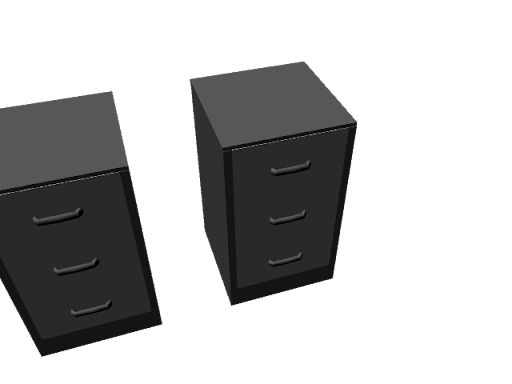
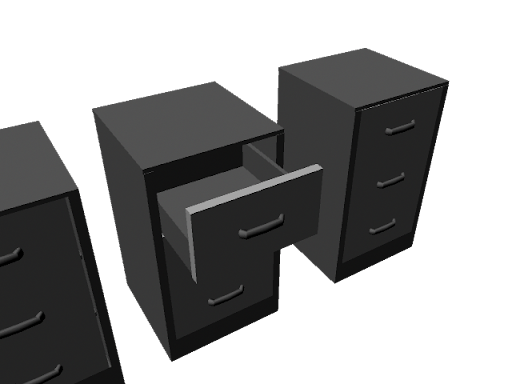
I've not added any textures to them yet, which is what I really should be working on over the summer, and I will eventually do some texturing, but for now they're alright in gray.

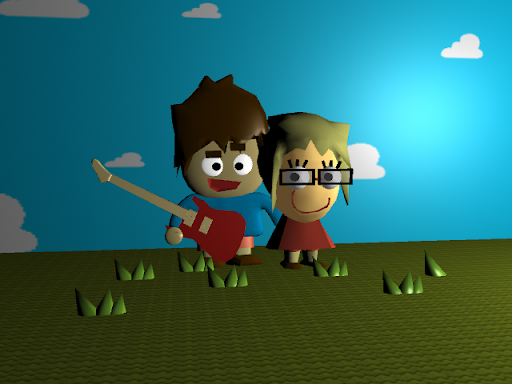
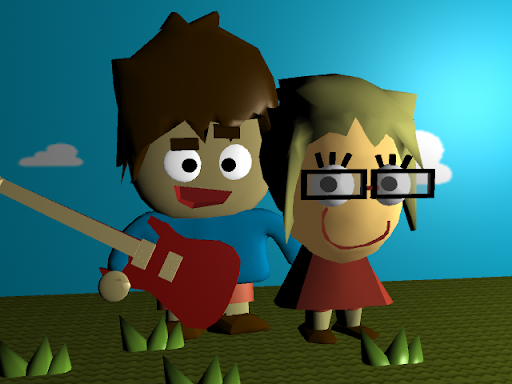
As well as this I worked on some 3D cartoon models I had created before, for an first anniversary card for my sister and her husband.

Friday, July 18, 2008

PHP (4) - Sorting By Date

PHP & MYSQL TUTORIAL/PROGRESS BLOG


Comments/Guest Book

PART 4 "Sorting By Date"


The next thing I wanted to do was to be able to sort the information backwards, so the latest items of data appear at the top. Although I realized this would be possible to do by simply doing a descending sorting of the ID, I thought it would be more useful to sort descending by date as this is another piece of information that would be useful to provide on a comments page/guest book, etc.

Adding Date field into database table

This is done by going back into the phpMyAdmin front end and clicking the structure tab. Underneath the table is a bit that says Add (number) field(s) At End of Table/At Beginning of Table/After (field name). Since it is more organized to keep the ID as the first field, choose After, and the field name you want it to be after (ID in this case). Name the field 'Date' and select type as 'Date' too. Save this then go back to the php file.

Writing the date into the database

All you need to do in the php is add 'Date' into the list of fields you are adding to and 'CURDATE()' as its associated value. The line should look like this:

$query = "INSERT INTO example1 (Date, Name, Subject, Comment, URL) VALUES (CURDATE(), '$Name', '$Subject', '$Comment', '$URL')";


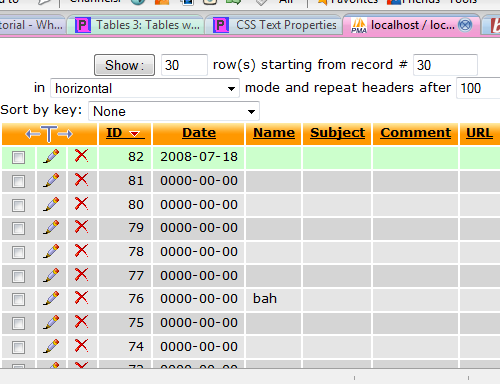
Save the file and open it from within Firefox. Press submit and then if no errors appear, go back into phpMyAdmin and click the Browse tab, where you should see the date stored in the most recent Id's date field (click ID to make the ID list descending so the newest is at the top).


Information/help from:

page resource
electric toolbox
Tiz Taz

©Chris Guiblin 2008
URL: www.guiblin.com/chris/
EMAIL: chris@guiblin.com

Creating and Retrieving MySQL Data (2)

PHP & MYSQL TUTORIAL/PROGRESS BLOG

Comments/Guest Book


PAGE 4 "Creating and Retrieving MySQL Data (2)"

Creating HTML form

Below is the html I used for creating the table which is used to enter data to be added to the form.
<table width="200" border="0" cellspacing="0" cellpadding="1" align = "center">


<tr>
<td width="100">Username:</td>
<td><input name="username" type="text" id="username"></td>
</tr>


<tr>
<td width="100">Subject:</td>
<td border = "0"><input name="subject" type="text" id="subject"></td>
</tr>


<tr>
<td width="100">Comment:</td>
<td><input name="comment" type="text" id="comment"></td>
</tr>

<tr>
<td width="100">URL:</td>
<td><input name="url" type="text" id="url"></td>
</tr>


<tr>
<td width="100"> </td>
<td align = "right"><input name="add" type="submit" id="add" value="Submit"></td>
</tr>


</table>


The 'id' is what the php code looks at and gets the data from. The finished php file for the file looks like this:

<html>
<head>
<title>Add New Comment</title>
<meta http-equiv="Content-Type" content="text/html; charset=iso-8859-1">
</head>

<body>
<?php
if(isset($_POST['add']))
{

$dbhost = 'localhost';
$dbuser = 'root';
$dbpass = '';

$conn = mysql_connect($dbhost, $dbuser, $dbpass) or die ('Error connecting to mysql');

$dbname = 'test1';
mysql_select_db($dbname);

$Name = $_POST['username'];
$Subject = $_POST['subject'];
$Comment = $_POST['comment'];
$URL = $_POST['url'];

$query = "INSERT INTO example1 (Name, Subject, Comment, URL) VALUES ('$Name', '$Subject', '$Comment', '$URL')";
mysql_query($query) or die('Error, insert query failed');

$query = "FLUSH PRIVILEGES";
mysql_query($query) or die('Error, insert query failed');


echo "Comment Added <br><br>";

$query = "SELECT Name, Subject, Comment, URL FROM example1";
$result = mysql_query($query);

while($row = mysql_fetch_array($result, MYSQL_ASSOC))
{
echo "----------------------------------- <br>" .
"Name: {$row['Name']} <br>" .
"Subject: {$row['Subject']} <br>" .
"Comment: {$row['Comment']} <br>" .
"URL: {$row['URL']} <br>";
}
mysql_close($conn);

}
else
{
?>
<form method="post">

<font size="1" face="Arial">

<table width="200" border="0" cellspacing="0" cellpadding="1" align = "center">


<tr>
<td width="100">Username:</td>
<td><input name="username" type="text" id="username"></td>
</tr>


<tr>
<td width="100">Subject:</td>
<td border = "0"><input name="subject" type="text" id="subject"></td>
</tr>


<tr>
<td width="100">Comment:</td>
<td><input name="comment" type="text" id="comment"></td>
</tr>

<tr>
<td width="100">URL:</td>
<td><input name="url" type="text" id="url"></td>
</tr>


<tr>
<td width="100"> </td>
<td align = "right"><input name="add" type="submit" id="add" value="Submit"></td>
</tr>


</table>
</font>

</form>
<?php
}
?>
</body>
</html>
Note that the entire php section is placed within the html tags. However, the file must still be saved as a php file for it to work. Ensure that the id's in the html section towards the end are the same as the values for the defined variables such as $Name, $Subject etc. I have emphasized these in bold.

The easiest way to understand all this is to look at it a few times and then try making some changes. Try changing the look of the form as well as how the information is displayed once it is submitted.

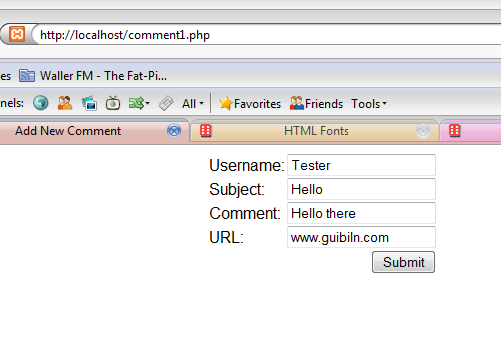
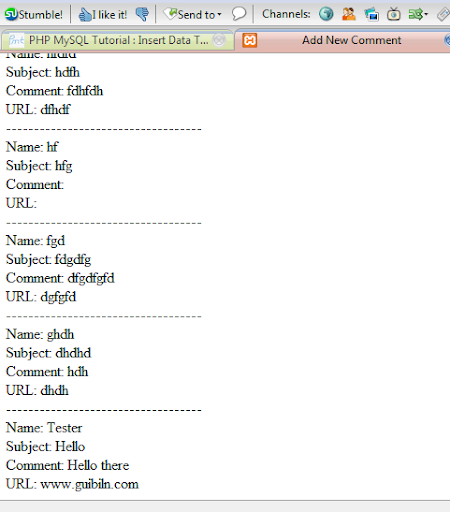
The images below show how it should look (yes I spelled my own surname wrong)


Thursday, July 17, 2008

PHP (3) - Creating and Retrieving MySQL Data

PHP & MYSQL TUTORIAL/PROGRESS BLOG

Comments/Guest Book


PAGE 3 "Creating and Retrieving MySQL Data"


Adding data to the database

To add the data you must use a query. Add the following code to your php file, after "mysql_select_db($dbname);" and before "?>"

$query = "INSERT INTO example1 (Name, Subject, Comment, URL) VALUES ('Bob', 'Hey', 'Once upon a time, the end', 'http://chrisgibbo.blogspot.com')";
mysql_query($query) or die('Error, insert query failed');

This adds the values to their relative fields, so ordering the fields and values correctly is essential. Do not add the ID as one of the fields, as the ID field is handled automatically.

Save the file (as a .php file) and open it in your browser. There will still be nothing there (if there is an error go back through and make sure you didn't miss anything. Now go into the phpMyAdmin front end. Go into the table under the database you created and choose browse. You should see the information there. Try refreshing the php file you created several times to ensure that it keeps adding the data on to the end.


Retrieving data from the database
The following will only display data which already exists in the database. It will not add it and then display it, so ensure you have followed the above section first before trying this bit.


The final code to both enter the data and retrieve it:

<?php
$dbhost = 'localhost';
$dbuser = 'root';
$dbpass = '';

$conn = mysql_connect($dbhost, $dbuser, $dbpass) or die ('Error

connecting to mysql');

$dbname = 'test1';
mysql_select_db($dbname);

$query = "INSERT INTO example1 (Name, Subject, Comment, URL) VALUES ('a', 'b', 'c', 'd')";

mysql_query($query) or die('Error, insert query failed');


$query = "SELECT Name, Subject, Comment, URL FROM example1";
$result = mysql_query($query);

while($row = mysql_fetch_array($result, MYSQL_ASSOC))
{
echo " Name :{$row['Name']} <br&gt;" .
"Subject : {$row['Subject']} <br&gt;" .
"Comment : {$row['Comment']} <br&gt;" .
"URL: {$row['URL']} <br&gt;.&lt;br&gt;";
}

?>

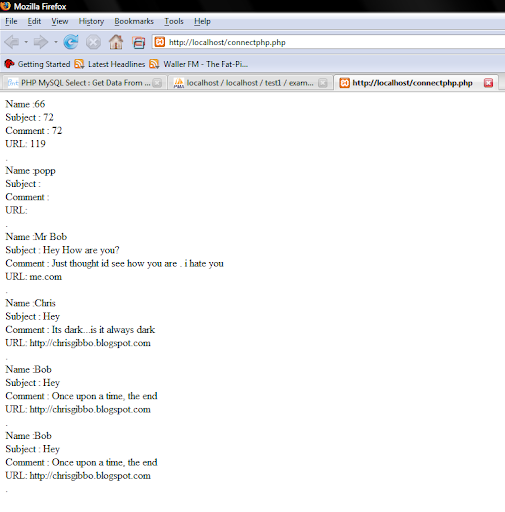
Save and refresh to show the same page with the added content (a, b, c and d in my example). Keep refreshing and the page should add the same data to the bottom of the page over and over again.

Information/help from:

Collin Jensen
php.net
php mysql tutorial


©Chris Guiblin 2008
URL: www.guiblin.com/chris/
EMAIL: chris@guiblin.com

PHP (2) - MySQL Database

PHP/MYSQL TUTORIAL/PROGRESS BLOG


Comments/Guest Book


Xampp phpMyAdmin
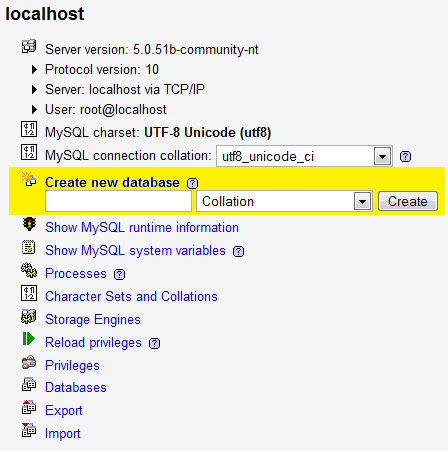
One thing I like about XAmpp is the built version of phpMyAdmin, which is an easy to use front end for MySQL. This can be accessed by going to "http://localhost/xampp" and following the link to phpMyAdmin under the tools section of the left hand navigation, on the XAmpp front page (http://localhost/phpMyAdmin).

CREATING A NEW DATABASE
A new database can be created easily using the Create new database field:


CHOOSING TABLE NAME AND NUMBER OF FIELDS
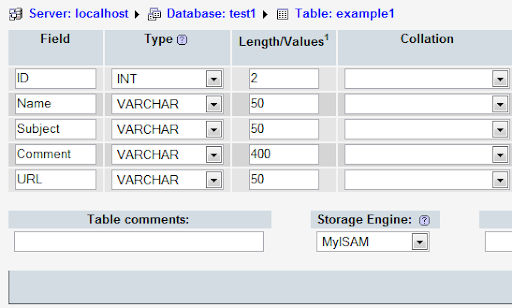
I have named my database "test1", on the next page choosing "example1" as the new table on the database. I chose five for the Number of fields (different bits of information that will be entered into the table). When creating a database it is best to plan what information is going to be entered into the table and entering the Number of fields accordingly. Both the database and table name should be relevant to what it is going to be used for so you can remember what is what when you have multiple databases and tables.

FIELD NAMES, TYPES AND LENGTHS

For this Database table I chosen field names which would be used on a comments page or guest book; Name, Subject, Comment and URL, as well as ID which will be the comments number (1 for the first comment, 2 for the second, etc). I have set the field type for ID to INT, with the others as VARCHAR. For the Length/Values, I have chosen numbers which I think will be about right for these field inputs.

I have also chosen for the ID field to be set to 'Primary' and 'auto-increment', which makes it the primary field as well as automatically increasing the number in the field as required for the ID field. Choose the Collation you want (chosing none defaulted to latin1_swedish_ci for me, so I chose to use ucs2_bin).


CONNECT TO DATABASE WITH PHP
Now to the coding. Bring up your text editor and enter the following:
$dbhost = 'localhost';
$dbuser = 'root';
$dbpass = '';

$conn = mysql_connect($dbhost, $dbuser, $dbpass) or die ('Error connecting to mysql');

$dbname = 'test1';
mysql_select_db($dbname);
?>
Things you may have changed which may be causing you problems: If you have set up a username and password for your database, change these accordingly under "$dbuser = " and "$dbpass = ". Also, if you didn't call your database "test1" then type whatever you did call it under "$dbname = ". Also ensure there are ";"'s at the end of every line where it is needed.

Save this file as a php file (I named mine connectphp.php) in C:\xampp\apache\htdocs (or the relative location if you put it somewhere else). Access the page in your web browser (http:\\localhost\connectphp.php in my case) and it should be blank, which is a good sign that it hasn't caused an error.


Information/help from:

Collin Jensen
php.net
php mysql tutorial


©Chris Guiblin 2008
URL: www.guiblin.com/chris/
EMAIL: chris@guiblin.com

PHP (1) - Hello World

PHP & MYSQL TUTORIAL/PROGRESS BLOG

Comments/Guest Book

PAGE 1 "HELLO WORLD"


Introduction


For this tutorial bog I am using Xampp running all the available services included with it on a home computer not running as a web server. Most of the information is going to be the same whether or not you are using Xampp. One thing to note is that not all webspace providers support php and mysql. If you are using a service like this, check whether php and mysql are supported with them before attempting any sort of php /mySQL project.

This tutorial is as much a documentation of what I am doing than teaching how to do it. Although I have some previous experience with web servers, programming and a very small amount with PHP and mySQL, this is a learning experience for me, I just thought it might be useful to write how I am doing it, for anyone else who might be attempting this and has come across this page. If you spot anything wrong then please send a comment or email me and I will check it out.

DOWNLOAD AND INSTALLATION (windows)

Firstly, install XAMPP from
http://www.apachefriends.org/en/xampp.html. I first tried the ZIP file
and tried installing the windows version on my computer. However this
failed, I think because I am using vista and the version wasn't made
for that. So probably best using the installer. Follow the installation
(don't install to program files if in vista, as it will tell you),
enabling the services you want. You must enable php for the above to
work. I have installed everything as I will be dabbling with mysql and
possibly other services later on.


VIEWING/EDITING THE INDEX PAGE


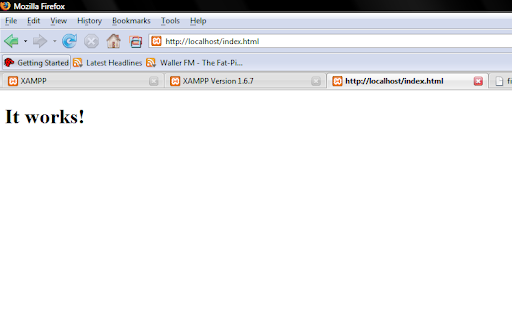
In your web browser go to "http://localhost". This brings up
the yellow and orange xampp page with information and demos, etc. This
will take you to "http://localhost/ampp". Change it to
"http://localhost/index.html to view the index page, which will display
the text "It works!"


To get to where this page is actually stored in your computer,
go to the directory where you installed Xampp ("C:\Xampp" in my case).
You should see a folder named "htdocs". This is where the pages are
stored which will actually be accessible through the web server. In
here you will find a file "index.html", which is the page displayed
when you go to "http://localhost/index.html".


To edit the content of the page, open the file with notepad,
dreamweaver, or any other text editor/web design software. If you don't
understand any of what has come up, you should probably go searching
Google for help or buy a book on basic html. All you need to do to
change the text on the page is to change the text between the tag


Once You have done this, save the text file and reload the page in your browser to display the change.


PHP

Since PHP works differently to html, we will need to change
the file in a few ways to make it work using php. Php in itself is not
built into browsers like html is, therefor it is up to the server to
deal with the php code, and that is why php needed to be installed as a
service earlier.


To create a php document, you must start with "<h&gt;" to show that this is the end of the php code.

To create the words "Hello World" or "It works!" you use
the command "echo" which just means to display the value of something.
In this case you just want to display a string value, so you just need
to type the following:

<?php
echo "Hello";
?>
notes: you must put ";" at the end of echo "Hello" to show
that this is the end of the line of code, and to allow the action to be
performed.


Information/help from:

Collin Jensen
php.net
php mysql tutorial


©Chris Guiblin 2008
URL: www.guiblin.com/chris/
EMAIL: chris@guiblin.com

PHP, Programming etc

I have tried several half attempts at installing php and mysql onto my server and gave up, I havn't got anywhere web design or php wise. I keep setting myself projects to get this done, and to create a website, but then I keep giving up.Anyway my friend from about five years back (Jensen) who used to make php websites for my comic management pointed me in the direction of an application called XAMPP which does the whole php, mysql thingy really easily. For now I just have it on my desktop computer to learn some php. Once I have some stuff to put up I will probably install it on the server.

Anyway, I think it is working:Not actually tried it out yet, but I thought I would post something since it has been a while. I have been away for three weeks visiting family (instead of the originally planned one or two weeks). Although I got a lot of designs and stuff done I didn't have access to a computer and so didn't get anything done in any projects I was hoping to achieve. Anyway, my newly revised aims for the rest of the summer are to:1/ learn php and get some basic websites made using the language2/ Design a simple, but polished room in Maya3/ Create an interactive comic/gameI have also added a plug in for Firefox called ScribeFire which allows you to post directly to your blog from your web browser. I haven't tried posting yet, but if this blog posts successfully then I would definitely recommend it.

Anyway my friend from about five years back (Jensen) who used to make php websites for my comic management pointed me in the direction of an application called XAMPP which does the whole php, mysql thingy really easily. For now I just have it on my desktop computer to learn some php. Once I have some stuff to put up I will probably install it on the server.

Anyway, I think it is working:


Not actually tried it out yet, but I thought I would post something since it has been a while. I have been away for three weeks visiting family (instead of the originally planned one or two weeks). Although I got a lot of designs and stuff done I didn't have access to a computer and so didn't get anything done in any projects I was hoping to achieve. Anyway, my newly revised aims for the rest of the summer are to:

1/ learn php and get some basic websites made using the language
2/ Design a simple, but polished room in Maya
3/ Create an interactive comic/game

I have also added a plug in for Firefox called ScribeFire which allows you to post directly to your blog from your web browser. I haven't tried posting yet, but if this blog posts successfully then I would definitely recommend it.

(update: it works great)

Wednesday, June 18, 2008

Game design concepts

I am currently working on designs for the start of a game idea I hav come up with. The aim is to create a realistic looking, believable futuristic setting. I am concentrating on one building for now, the home of the main character, and on the designs of individual bits which give the feeling of a futuristic setting. This includes showing advanced technologies suh as animated wallpaper and digital displays projected on many surfaces such as walls, mirrors and windows. I will work on transparency and animated textures in maya and the unreal engine to achieve these effects. Currenlythese advanced features are just conceptual and I have not yet implimented them into any software yet.

I will also look into the use of programming within unreal to see if it going to be an achievable goal to have the character interact with the differnent displays to effect different parts of the room. If this is not going to be easily achieved then I will simply code a GUI in C showing how the system would work, and havedifferent preview screens within the program showing how the displays would change the look of different rooms.

I would also like to experiment with scripting in unreal and the creation of objects which can be picked up and used to solve puzzles etc. Dialogue/Monologue would also be important in the sort of adventure game I wiso create/demonstrate. If this is not easily achieved in unreal then again I wll look at other methods of demonstraingtis in C or actionscript.

As I am going away for a week or so, I wl justbe working on more concepts and designs before creating anything more in maya and unreal. I will scan in some designs at a later date date as well as get some screenshots of what I have done already (I'm not on the right computer at the moment to get anything like that).


Wednesday, June 04, 2008

Unreal Level

Ahhh all projects for this year done and handed in, just an essay to hand in tomorrow which I'm printing out now. I'm pretty happy with the work I have done this year, and although I think I was a bit ambitious with the scale of my level, which I think ended up with it being more quantity than quality I still think it turned out quite well. Its not up to a proffessional standard but it has been very useful working on the unreal level, in learning how to use the game engine as well as the 3D software maya. I know I would be able to create the same level with much more ease if I were to do it again.

Over the summer I am going to try and achieve a few projects.

1. Another unreal level. A bit smaller than the one I have done for the term three project, but with more detail and more work with maya and photoshop in creating tiles. I might have it completely platform based and try and work with some of the physics to make a more advanced, less first person shooter-ish level.

2. Work on my website, put some new stuff on it, get my projects up on there, etc

3. Come up with a game concept/idea for a flash or unreal level, plan it out and if I have time start working on it. Something to put on blog.

4. Some work with maya creating general static meshes to use on projects.

5. A summer comic of some kind, maybe an interactive animated comic or something.

map of my almost finished level (made changes since) quite a bit of the level is underground so this picture is pretty pointless :P

Tuesday, May 13, 2008

House Model

This has taken a lot longer than I'm sure it should have. Oh well my first real attempt at UV Mapping. Really enjoyed it actually, just a bit frustrating. There are rooms in the house, and just a big open space upstairs.

So much more left to do. I still have the actual level to design (though I have done a lot of planning and a bit of the level planned out) and loads more stuff to make. As well as putting it into unreal, doing the lighting, etc.

And now blogger is being rubbish and not letting me upload pictures again

Tuesday, May 06, 2008

Static Meshes and Sky Box


A static mesh of a building created in maya based on drawn designs. I have had problems with importing static meshes into unrealED, with it complaining that there are 'not enough vertexes'. Much more simple objects such as primitive cubes and much more basic rooms will import though.
Creation of a sky box in unrealED 2004, following the tutorial here.


Friday, May 02, 2008

UnrealEd 2004


I've not updated in a while. Been doing a lot of level planning, mostly on paper, brain storming ideas etc. I will probably scan and upload some at some point. Anyway, I have just started doing some work in UnrealEd 2004 having got a copy off my course mate and been working on a very basic map, which I intend to gradually build up into my finished unreal level.


The editor seems a bit alien at first, especially due to differences in controlling and moving objects to 3D software such as Maya and 3DMax,and so the work I am doing at the moment is quite primitive. I have also been doing some work in Maya with creating static meshes for the editor.


Monday, April 07, 2008

Stuff I've been doing

I have redesigned my website, created a new banner, background, added links to other pages of mine, such as this blog, my flikr account, etc.


(http://www.guiblin.com/chris)


I have created the flickr account which I have been adding some pictures to, including 3D things created in maya and 2D stuff from Illistrator.


I have been doing a lot of sketching of random character designs and stuff, mostly quite abstract and cartoony. I have scanned a sketchbook in and created a PDF file of it. The upload for the whole PDF keeps timing out both on my server back at home and my file den account, blogger too is refusing to upload pictures any more to here, so I will try again later. (one page can be seen as the background image of my website).

I have also been doing some colouring in of images that I sketched and scanned in. (I uploaded these before i tried the sketches that wont upload)


Daily Routine by ~chrisguiblin on deviantART

Other stuff: been doing a little bit of playing around with Visual C#, learning some basic stuff. I haven't got anything really to show from that but just been learning to use different controls, create them at run time and other window related stuff.

Also got my hands on UnrealEd 3 and been doing some practicing of that in creating simple rooms and such. I have been watching videos on Game Trailers (http://www.gametrailers.com/player/usermovies/136126.html) showing basic tutorials on using the engine. I have been writing notes on stuff I have learnt from the tutorials I have watched so far and this will be very usefull for this terms project.

What else....I have been working a bit on my flash game from my last term's project, 'Wizards'. I have started it from scratch and using online tutorials about tiles used in tile based platform games I have created a basic way of using arrays to map out the levels. To do this on a bigger scale I need to look into using xml files to load in the level information, but I have given this a break for now to work on learning to use UnrealEd.

Sunday, March 16, 2008

Linux

One thing my games tutor Brad suggested was learning Linux and C++, both which are useful things to know and understand. Both of which I have actually wanted to know for a long time.

Strangely enough I had actually downloaded a version of Linux a week or so back, openSuSE 10.4. My Dad and I had previously experimented with this distribution of Linux back at versions 6.4 and then again at 8.0. We had always had problems with the operating system, never quite working properly. However, since I had been ill over the weekend and stuck up in my room and bored I decided to get Linux installed on my barely used laptop. After having some difficulties with swap partitions and the boot record (I had managed to mess the hard drive up some how) I managed to install the operating system and everything has worked perfectly from then. All the hardware compatibility issues I had found with previous versions were gone, and I am very happy with the system, and my laptop is at last getting use again.

While exploring the installed programs included with the OS and the other software on the disk I came across a program under development called qt designer. Bored, and having no idea what it was I opened it and found it was a widget maker. This uses C++ as the language for programming these widgets. I have worked my way through a couple of the basic tutorials, managing to get "hello world" and similar stupidly basic examples working. Hopefully as I continue with this I will learn C++ (which seems very similar to the actionscript I was using in my Flash Game project, so hopefully this won't be too hard).

So not only am I learning Linux and C++, I am learning C++ in Linux. I am also playing the Curse of Monkey Island which has nothing to do with anything, but its fun! (apparently using ScummVM this can be run on Linux, which if I was doing would actually tie in to this post but....I'm not.) :)

Also working on my website, started from scratch again. I wouldn't like to think about how many times I have done this. I guess its because I never really spend all that much time and effort making it look how I want, so whenever I come back to it I don't like it. Anyway I'm keeping it simple for now and will upload soon and hopefully put stuff on it. I keep writing about it in my posts so that when I read them back I will feel guilty and get on with it :P

The fact I have been posting so much lately shows how bored I am lately! The next thing I need to do for my course is get hold of Unreal Tornament 2003 (think thats the version I need) and a book on the game engine as we will be designing a level for it next term, which I am looking forward to but can imagine will be quite difficult so I should really get learning it now!


web pages I looked at and used to fix my hard drive issues in linux:

http://linuxhelp.blogspot.com/2005/11/how-to-repair-corrupt-mbr-and-boot.html
http://www.yolinux.com/TUTORIALS/LinuxTutorialAdditionalHardDrive.html
http://www.tuxfiles.org/linuxhelp/mounting.html
http://ubuntuforums.org/archive/index.php/t-33858.html

Friday, March 14, 2008

Further Flash Programming

Since working on the flash game project I have regained mhy interest in programming and am learning further about actionscript and programming in general.

I am currently working on understanding object movements and the maths behind the movement of objects. Using the code from a reply to a message in a forum (http://www.kirupa.com/forum/showthread.php?p=2297490) I have created a simple movement of a block which moves where you click the mouse.

The object does not stop when it reaches where the player clicked, however. Although I will experiment into how to make it stop when it does reach the location, I also think the block continuing to move would make a good little game if it were to bounce on the walls or to loop back round the other side, or give game over if you go off the side (probably the easiest method for now). By adding objects to collect and avoid this could be a nice quick little game.

Link: http://www.fileden.com/files/2007/11/6/1567526/2.swf

Term 2 Game Project - Completion

I have finished my game project for the second term. I am pleased with the outcome, though I got very stressed towards the end of the game and am very glad the project is over. I will, however, make slight ajustments to the game and then uplaod it to the internet.

As my games lecturer Brad said, this game will be useful in a games or programming job interview, being able to show original idea creation and to follow through with the actual creation of the game.


I am very pleased to have this game created and under my belt, feeling it will be a useful part of my portfolio.

Saying that, I really need to get on with creating a website to show all my stuff including games, animations, computer created graphics, sketches etc.

Mind reading

There seems to be quite a l0t of stuff I've been reading in the news and online lately about developments in science which allow thoughts to be read by computers to perform actions. I find this sort of thing facisnating and I think goes perfectly hand in hand with gaming and interactivy which are things I am very interested in. Here are some videos:

Voiceless phone call:


Controlling a rat with a laptop (bit weird but very interesting):


Second life being controlled with mind control:


Obviously very useful for people with paralysis etc, but also would be great for the entertainment industry. Hopefully in upcoming years the use for this will be applied to games, allowing a step up from the Wii's simulated interactivity to actually moving a character by thinking about walking, as though you are actually in the game.

Wednesday, March 05, 2008

Actionscript 3.0 Smooth character movement

Smooth Character Movement
In actionscript 3.0 when you program an object to move following a keypress, the object moves once then pauses before continue the moment. This is the way I have achieved smooth movement, not certain its the best or easiest way but anyway heres what I did:

Using the example of moving left

Under your 'keydown' function for the left key, type mLeft = true;
Then under your 'enterFrame' function, have an if statement saying:

if (moveLeft) {
myCharacter.x = myCharacter.x - 10;
}


Then, under your 'keyup' function for the left key, type mLeft = false;

You will need to define the following variables for the different keys:

var moveLeft:Boolean = false;
var moveRight:Boolean = false;
var moveUp:Boolean = false;
var moveDown:Boolean = false;

(the last two if you are moving the character up and down as well as left and right)

All the code:

//Defining the variables
var moveLeft:Boolean = false;
var moveRight:Boolean = false;
var moveUp:Boolean = false;
var mDown:Boolean = false;


//Adding Event listeners
stage.addEventListener(KeyboardEvent.KEY_UP, reportKeyUp);
stage.addEventListener(KeyboardEvent.KEY_DOWN, reportKeyDown);
stage.addEventListener(Event.ENTER_FRAME, EnterFrame);

//KeyDown function
function reportKeyDown(event:KeyboardEvent):void {
if (event.keyCode == Keyboard.LEFT) {
moveLeft = true;
}
if (event.keyCode == Keyboard.RIGHT) {
moveRight = true;
}

if (event.keyCode == Keyboard.UP) {
moveUP = true;
}
if (event.keyCode == Keyboard.DOWN) {

moveDOWN= true;
}
}

//Key Up Function
function reportKeyDown(event:KeyboardEvent):void {
if (event.keyCode == Keyboard.LEFT) {
moveLeft = false;
}

if (event.keyCode == Keyboard.RIGHT) {
moveRight = false;
}
if (event.keyCode == Keyboard.UP) {
moveUP = false;
}

if (event.keyCode == Keyboard.UP) {
moveDOWN = false;
}
}

//Enter Frame Function (this happens over and over repeatedly)
function EnterFrame(event:Event):void {
if (moveLeft){
myCharacter.x -= 10;
}
if (moveRight){
myCharacter.x +=10;
}

if (moveUp){
myCharacter.y -=10;
}
if (moveDown){
myCharacter.y +=10;
}

}
}

I *think* that this should work, if it doesn't I apologise and please comment and tell me what the error says or what is happening.

Bibliography

Just pasting a link here to remember for my bibliography for my game project.

http://blogs.adobe.com/pdehaan/2006/07/using_the_timer_class_in_actio.html

will have to search back through some other sites I have used for when I write out my bibliography which is something I need to do along with all the other paper work I need to do for the project along with other stuff I need to do this week.

Today's plans:
Get game over/score/lives/timer etc working
Get phidgets working

That should be enough since I can see phidgets being a pain. If still more time I may do some websitey stuff which I really need to get doing.

Monday, February 25, 2008

3D Modelling

I guess the previous post was a bit pointless. It was really just a reference for me to look back through, im not suggesting you watch through them unless your bored and have some time to spare looking through clips of people playing video games. Anyway I feel as though its time for an animation blog. Although I havn't done any animation as such in a while apart from a quick background movement for my flash game, I have created a few quick 3D models for birthday cards for my mum and my brother in law whose birthdays it was over the weekend. So here are the things I made.


As I said these were quick rushed jobs and so are not perfect, although I am quite pleased with these pictures, especially the guitar.