Showing posts with label web server. Show all posts

Friday, July 18, 2008

PHP (4) - Sorting By Date

PHP & MYSQL TUTORIAL/PROGRESS BLOG


Comments/Guest Book

PART 4 "Sorting By Date"


The next thing I wanted to do was to be able to sort the information backwards, so the latest items of data appear at the top. Although I realized this would be possible to do by simply doing a descending sorting of the ID, I thought it would be more useful to sort descending by date as this is another piece of information that would be useful to provide on a comments page/guest book, etc.

Adding Date field into database table

This is done by going back into the phpMyAdmin front end and clicking the structure tab. Underneath the table is a bit that says Add (number) field(s) At End of Table/At Beginning of Table/After (field name). Since it is more organized to keep the ID as the first field, choose After, and the field name you want it to be after (ID in this case). Name the field 'Date' and select type as 'Date' too. Save this then go back to the php file.

Writing the date into the database

All you need to do in the php is add 'Date' into the list of fields you are adding to and 'CURDATE()' as its associated value. The line should look like this:

$query = "INSERT INTO example1 (Date, Name, Subject, Comment, URL) VALUES (CURDATE(), '$Name', '$Subject', '$Comment', '$URL')";


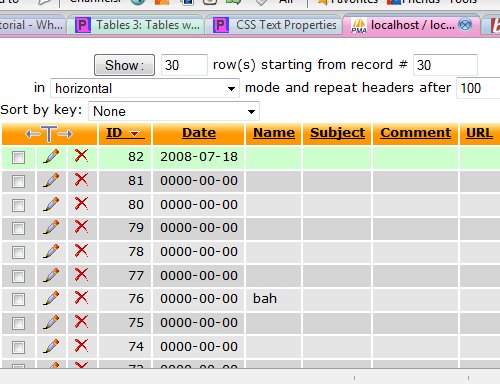
Save the file and open it from within Firefox. Press submit and then if no errors appear, go back into phpMyAdmin and click the Browse tab, where you should see the date stored in the most recent Id's date field (click ID to make the ID list descending so the newest is at the top).


Information/help from:

page resource
electric toolbox
Tiz Taz

©Chris Guiblin 2008
URL: www.guiblin.com/chris/
EMAIL: chris@guiblin.com

Thursday, July 17, 2008

PHP (2) - MySQL Database

PHP/MYSQL TUTORIAL/PROGRESS BLOG


Comments/Guest Book


Xampp phpMyAdmin
One thing I like about XAmpp is the built version of phpMyAdmin, which is an easy to use front end for MySQL. This can be accessed by going to "http://localhost/xampp" and following the link to phpMyAdmin under the tools section of the left hand navigation, on the XAmpp front page (http://localhost/phpMyAdmin).

CREATING A NEW DATABASE
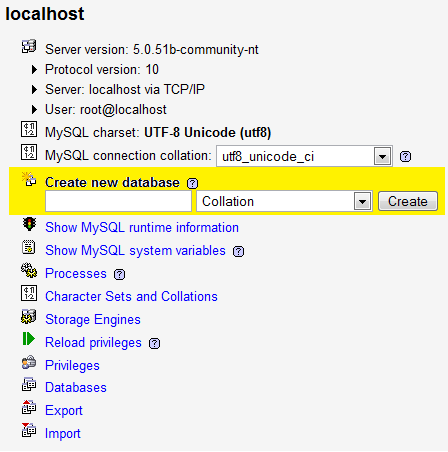
A new database can be created easily using the Create new database field:


CHOOSING TABLE NAME AND NUMBER OF FIELDS
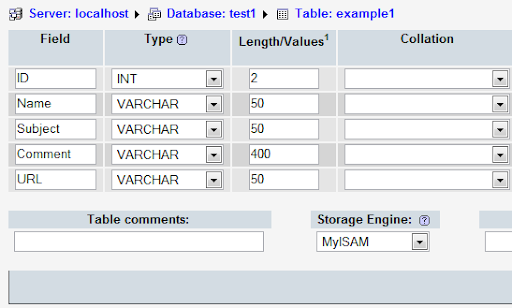
I have named my database "test1", on the next page choosing "example1" as the new table on the database. I chose five for the Number of fields (different bits of information that will be entered into the table). When creating a database it is best to plan what information is going to be entered into the table and entering the Number of fields accordingly. Both the database and table name should be relevant to what it is going to be used for so you can remember what is what when you have multiple databases and tables.

FIELD NAMES, TYPES AND LENGTHS

For this Database table I chosen field names which would be used on a comments page or guest book; Name, Subject, Comment and URL, as well as ID which will be the comments number (1 for the first comment, 2 for the second, etc). I have set the field type for ID to INT, with the others as VARCHAR. For the Length/Values, I have chosen numbers which I think will be about right for these field inputs.

I have also chosen for the ID field to be set to 'Primary' and 'auto-increment', which makes it the primary field as well as automatically increasing the number in the field as required for the ID field. Choose the Collation you want (chosing none defaulted to latin1_swedish_ci for me, so I chose to use ucs2_bin).


CONNECT TO DATABASE WITH PHP
Now to the coding. Bring up your text editor and enter the following:
$dbhost = 'localhost';
$dbuser = 'root';
$dbpass = '';

$conn = mysql_connect($dbhost, $dbuser, $dbpass) or die ('Error connecting to mysql');

$dbname = 'test1';
mysql_select_db($dbname);
?>
Things you may have changed which may be causing you problems: If you have set up a username and password for your database, change these accordingly under "$dbuser = " and "$dbpass = ". Also, if you didn't call your database "test1" then type whatever you did call it under "$dbname = ". Also ensure there are ";"'s at the end of every line where it is needed.

Save this file as a php file (I named mine connectphp.php) in C:\xampp\apache\htdocs (or the relative location if you put it somewhere else). Access the page in your web browser (http:\\localhost\connectphp.php in my case) and it should be blank, which is a good sign that it hasn't caused an error.


Information/help from:

Collin Jensen
php.net
php mysql tutorial


©Chris Guiblin 2008
URL: www.guiblin.com/chris/
EMAIL: chris@guiblin.com

PHP, Programming etc

I have tried several half attempts at installing php and mysql onto my server and gave up, I havn't got anywhere web design or php wise. I keep setting myself projects to get this done, and to create a website, but then I keep giving up.Anyway my friend from about five years back (Jensen) who used to make php websites for my comic management pointed me in the direction of an application called XAMPP which does the whole php, mysql thingy really easily. For now I just have it on my desktop computer to learn some php. Once I have some stuff to put up I will probably install it on the server.

Anyway, I think it is working:Not actually tried it out yet, but I thought I would post something since it has been a while. I have been away for three weeks visiting family (instead of the originally planned one or two weeks). Although I got a lot of designs and stuff done I didn't have access to a computer and so didn't get anything done in any projects I was hoping to achieve. Anyway, my newly revised aims for the rest of the summer are to:1/ learn php and get some basic websites made using the language2/ Design a simple, but polished room in Maya3/ Create an interactive comic/gameI have also added a plug in for Firefox called ScribeFire which allows you to post directly to your blog from your web browser. I haven't tried posting yet, but if this blog posts successfully then I would definitely recommend it.

Anyway my friend from about five years back (Jensen) who used to make php websites for my comic management pointed me in the direction of an application called XAMPP which does the whole php, mysql thingy really easily. For now I just have it on my desktop computer to learn some php. Once I have some stuff to put up I will probably install it on the server.

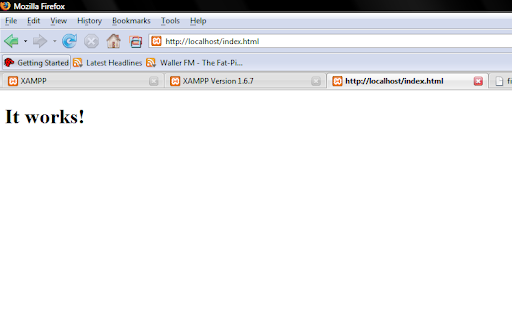
Anyway, I think it is working:


Not actually tried it out yet, but I thought I would post something since it has been a while. I have been away for three weeks visiting family (instead of the originally planned one or two weeks). Although I got a lot of designs and stuff done I didn't have access to a computer and so didn't get anything done in any projects I was hoping to achieve. Anyway, my newly revised aims for the rest of the summer are to:

1/ learn php and get some basic websites made using the language
2/ Design a simple, but polished room in Maya
3/ Create an interactive comic/game

I have also added a plug in for Firefox called ScribeFire which allows you to post directly to your blog from your web browser. I haven't tried posting yet, but if this blog posts successfully then I would definitely recommend it.

(update: it works great)